
Searching Cases by Name
Start at the county's Records Search hub. Pick the Odyssey civil, family, and probate route. Choose Party when you are tracing a person or a business. Fill in the fields marked in red; those are required. A common surname gets much cleaner with a first name or an attorney filter. Odyssey's help offers Soundex for similar-sounding names. A trailing asterisk works for a partial value, though you cannot use both at once.
- Open Odyssey and select Civil, Family, & Probate Case Records.
- Choose Party, then enter every required name field.
- Use Soundex for spelling uncertainty or a trailing wildcard for an incomplete value.
- Review results carefully and open the case-number hyperlink.
- Record the court, parties, status, settings, and key register entries before leaving.
| Field Label | Type | Required | Notes |
|---|---|---|---|
| Search area | Selector | Yes | Case Records or Court Calendar |
| Search By | Selector | Yes | Case, Party, or Attorney |
| Name | Text | Varies | Soundex or trailing wildcard, not both |
| Dynamic fields | Text/select/date | Varies | Red plus and bold red label show required fields |
The official help sets no maximum date range, result cap, export function, or refresh schedule. So narrow your search using only the fields on the screen, not some invented limit.
El Paso Odyssey Search Modes
Odyssey offers Case, Party, and Attorney modes for records, plus four routes under Court Calendar. Case works best with a complete cause number. Party shines when the number is unknown. Attorney trims the noise when names run common, and every case number in the results is a hyperlink to the case detail and its chronological register. The official local help screen documents these controls.
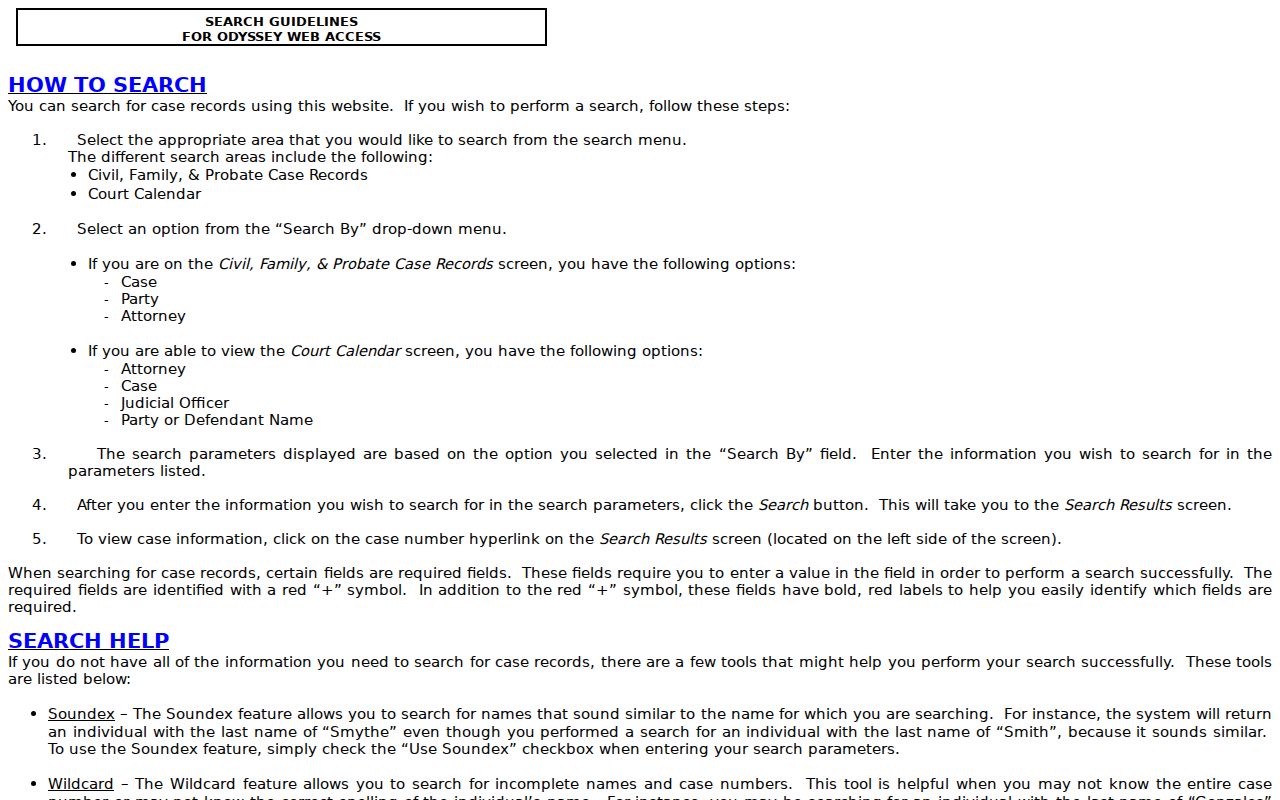
That help page earns its keep when the live search triggers web verification or when dynamic fields shift after you pick a mode. Keep it open in a second tab while you work.
Searching by Case Number
A complete cause number is the sharpest local key. Odyssey help gives real examples: 25001019P, 2008-2664-DR, and 2005-334-CCL2. Formats plainly vary by division and era. Don't force them into one made-up pattern. Type the number exactly as printed first. Wildcards are allowed on an incomplete value, but the help demands at least four characters, dashes excluded, for a case-number search.
A suffix hints at the route. DR shows up in a family-style example; CCL2 points to a County Court at Law. The code never replaces the court field on the result itself. Open the hyperlink and confirm the assigned court, style, filing date, case type, status, and register.
El Paso Wildcards and Soundex
Soundex hunts for names that sound alike, which helps when spelling is shaky. A wildcard puts an asterisk at the end of an incomplete name, case number, or cross-reference. Odyssey demands at least one character before a name wildcard, and four characters excluding dashes for a case or cross-reference wildcard.
You cannot pair Soundex with a wildcard. If the first pass comes back too broad, change one input at a time. Note which method produced your match. That note lets a clerk rebuild the query if the public result later vanishes.
What a Case Search Returns
An El Paso County case result can show the case header, parties, attorneys, court, judge, type, and status. Register events and settings may appear too. Treat the public view as an index. It does not promise that every filed image is free or available. Some fields may stay hidden depending on the case. Confirm details with the clerk when the record must be exact.
| Case Number | The linked local cause number. |
|---|---|
| Style / Parties | The case caption and public party names. |
| Case Type | Civil, family, probate, criminal, or another category. |
| Filed Date | The date the clerk opened the matter. |
| Status | Open, closed, pending, or disposed as the system labels it. |
| Register | Filed events, notices, settings, orders, and disposition entries. |
A red W flags active warrant information in Odyssey. It is only an alert, never a conviction or final disposition. Read the event history and the final judgment before reading anything into one icon.
El Paso Docket Versus Document
The docket says what was filed. A document is the petition, motion, order, judgment, exhibit, or charging instrument behind that entry. A certified copy is a clerk-certified version you request for formal use. A visible entry promises neither a free PDF nor certification.
When an image is missing, write down the exact entry title and date before calling the District Clerk or County Clerk. That detail beats asking for "the whole case." For copies and certification after the search finds the file, the El Paso County court records process covers the next steps.
Statewide vs County Case Search
Local Odyssey is the practical first stop for any El Paso County case. re:SearchTX adds a statewide layer of participating records and filings through account-based, role-based access. The 2024 Texas Judicial Council report said its document collection excluded criminal case records at that stage. So it cannot replace the local criminal clerk who holds those files.
| re:SearchTX | El Paso Odyssey |
|---|---|
| Participating Texas records and filings | Local civil, family, probate, and calendar access |
| Account and role-oriented access | Public local search and case hyperlinks |
| Useful as a statewide supplement | Best first step for a known El Paso County case |
Traffic and Class C matters may live in county ePay or a city municipal system instead. Federal cases belong to PACER. Identify the court first, then decide which portal truly failed you.
No El Paso Search Result
Check spelling, case format, court layer, and whether Soundex or a wildcard fits your situation. Still nothing? Call the District Clerk at 915-273-3534 for district records, or the County Clerk at 915-273-3532 for county-court-at-law and probate-civil records. A Justice or municipal case stays with its own clerk. You can also go in person at the responsible counter inside the El Paso County Courthouse, 500 E San Antonio. Ask about any public terminal or inspection process. The county publishes no terminal details, so don't count on a machine or staff-assisted search being there. Older files may need a written request for a copy.
Access and Restricted Cases
Access has real limits. Texas Rule 21c requires sensitive data to be redacted from filed documents. Juvenile, adoption, child-protection, and some family or protective matters carry added statutory or court-ordered restrictions. So you might see a public case shell while one filing stays sealed. Or a docket you can read while the images are withheld.
Restricted is not an outcome. It does not mean the case was dismissed, acquitted, or closed. The District Clerk states that adoption access is limited. It asks for enough case, child, and adoptive-parent information to assess entitlement. A clerk cannot override a sealing order. Ask the court or custodian what motion, order, identity proof, or relationship proof is required. Keep sensitive identifiers out of any broad public request.
Record Before Calling El Paso
Gather your details before you call a clerk. Write down the full cause number, the exact party spelling, the court, case type, filing date, current status, and the title and date of the entry at issue. Save any error message from Odyssey. With those facts, staff can tell a wrong search route from a record that is sealed, old, not digitized, or held by another court.
Ask a narrow question. For a setting, call the coordinator. District documents go through District Clerk Customer Service. For a county misdemeanor or probate-civil copy, use the County Clerk division. If the case is municipal, Justice, or federal, contact that separate custodian instead of repeating the same county portal search.
Note: A search result is a public research view, not a certified statement of the current case file.
Choose the Right El Paso Custodian
El Paso County splits its clerk duties. That is why one name search cannot cover every case. The District Clerk keeps district civil, family, felony, juvenile, and appellate clerk records. The County Clerk holds county-court-at-law misdemeanor and civil-probate records. Justice Courts and municipal courts keep their own lower-court registers. Federal district and bankruptcy cases use federal systems.
The current county directory groups district courts by workload: mixed civil-criminal, civil-only, criminal-only, and family-only. County Courts at Law handle defined statutory matters. Justice Courts hear small civil, eviction, and Class C cases within their authority. Probate Courts have their own specialty records. A transfer or appeal may leave history in one docket. It may also open a linked cause in another.
What if the search returns several people with the same name? Compare the case number, court, type, filed date, and party role. Never infer identity from a name alone. When you know the attorney, the Attorney mode can narrow the result set. Is only part of a case number legible? Use the official trailing-wildcard rule. Then verify every returned field.
The portal's public-service disclaimer says data may not be complete or accurate. Treat it as a research view. For a time-sensitive setting, contact the court coordinator. For an actual filed image or certified copy, contact the clerk. For a lower-court case, call that court. This fallback chain beats repeating a broad name query in the wrong database.
Note: Confirm a time-sensitive search result with the assigned court before relying on its setting or status.